Executive summary
AI usage constraints look like a budget problem at first. They usually reveal whether a team has an operating model for AI-assisted work.
A mixed knowledge-work team can move past casual experimentation and still burn through useful capacity. In the operating example behind this brief, the team was already using AI inside the work environment, pointing it at files, and letting sessions run long enough to produce real work. The constraint became visible when a capable user ran out of credits early. The problem was not lack of effort. The work kept starting with too little shape: weak planning, thin reusable context, no deliberate model choice, scattered reference material, and no closeout that helped the next session begin from what had already been learned.
Teams are adopting AI faster than they are adopting the habits that make AI repeatable. When usage feels almost unlimited, long exploratory sessions can hide the cost of rediscovery. Credit or quota limits make that cost visible because the team spends usage recovering context and decisions the organization already had.
Buying more capacity may still be necessary in some environments, but capacity alone will not fix the work pattern. Teams need a baseline for meaningful AI sessions: start with enough context, keep the work inside a defined scope, preserve useful decisions while the work happens, and close in a way that lets the next session continue without starting cold.
A better session is shaped before the model ever begins. The user brings a short brief and the relevant files, names the role the agent should play, picks the model tier on purpose, and states what done looks like. When the session closes, it leaves a handoff the next user or agent can use. Managers should protect the shared layer that makes this possible: time, owners, review paths, and boundaries. AI champions should turn repeated lessons into reusable defaults. Individual users should stop opening meaningful AI work as a blank chat and stop ending it without continuity.
The adoption sequence matters. Session-start and closeout routines come first because they change the immediate work habit. Durable project context follows for recurring work. Role-specific agents, skills, registries, routing policies, and evaluations become useful once the team has real patterns worth preserving.
The practical operating standard is:
- Start and close meaningful AI sessions differently.
- Make durable context part of the project, not a favor someone performs later.
- Route repeated work by role, context, tools, model tier, and evaluation standard.
- Use the cheapest capable model once the task and quality bar are clear.
- Keep shared defaults in a reviewed registry once patterns are worth preserving.
- Mature from ad hoc chat toward evaluated, role-specific agentic work at the pace the team’s habits can support.
The point is to get more useful output from the AI usage the team already has, without making every user become an engineer.
1. Why usage constraints matter now
For many teams, the first phase of AI adoption was exploration. People tested prompts, asked for summaries, generated drafts, tried code assistance, and let the system run longer when a task seemed important. That phase was useful because people learned the tool by using it. When usage constraints become visible, the same habits need to mature.
The problem begins when exploratory habits become the default for constrained agentic work. A user opens a session and lets the agent learn the task gradually: first the goal, then the files, then the missing context, then the revisions, then the exceptions. Sometimes that discovery is unavoidable. Most of the time, it means the model is spending usage on operating discipline the team could have supplied before the session began.
Under interaction-style consumption, a long session could feel like reasonable ambition. Under credit or quota constraints, the same behavior becomes expensive unless the team has discipline around context, planning, model choice, reuse, and evaluation. The constraint is no longer only the number of interactions. Compute cost becomes visible to the user, and teams without operating discipline feel it sooner.
If a capable user runs out of credits early, the first response may be to buy more usage. In many cases, more capacity may still be necessary. The better diagnostic is to look at the work pattern that produced the usage.
Common causes are straightforward:
- the session started without a short plan;
- the agent had to rediscover the project;
- files and examples were not prepared up front;
- the user defaulted to a stronger model when a cheaper one may have been enough;
- previous decisions stayed trapped in chat history;
- repeated patterns never became reusable templates, skills, or context files;
- the session ended without a handoff for the next session.
Those are operating-model problems. They create repeated setup cost, private learning, and avoidable model time spent on work the team could have preserved.
2. The operating problem: ad hoc AI work does not scale
Ad hoc AI use feels natural because chat is easy. The interface invites the user to start talking before the work has been shaped, which is harmless enough for casual use but costly for agentic work.
Agentic work is different from casual chat. The agent may inspect files, modify artifacts, run tools, compare sources, draft documents, write code, create plans, or operate inside a project over a long session. The quality of that work depends on the context the agent receives, the role it is playing, the tools it may use, the model behind it, and the standard used to judge the result. If those pieces stay implicit, the agent improvises and the user improvises with it.
The result is repeated context reconstruction. Each session has to relearn the project: the relevant files, constraints, prior decisions, expected style, and standard for done. The team pays for that setup again and again.
Expensive models become a substitute for preparation. A stronger model can often survive weak context better than a weaker one, but the team may be paying for avoidable recovery work.
Team learning also stays private. One person discovers a good way to start a task, but the pattern remains in their chat history. Another person solves the same setup problem a week later. A manager cannot tell whether the team is improving because reusable knowledge is scattered across conversations.
Documentation slips for the same reason. People know they should write down what changed, but delivery pressure makes documentation easy to postpone. The next AI session then starts with less context and consumes more usage recovering what the last session already knew.
Workflows drift when every user invents their own habits, templates, and standards. Some of those habits work, some waste usage, and some create risk. Without a shared layer, the team has no practical way to tell the difference.
Usage constraints make the waste concrete. A messy session no longer stays abstract; it can end by hitting a limit.
3. The core standard: session lifecycle
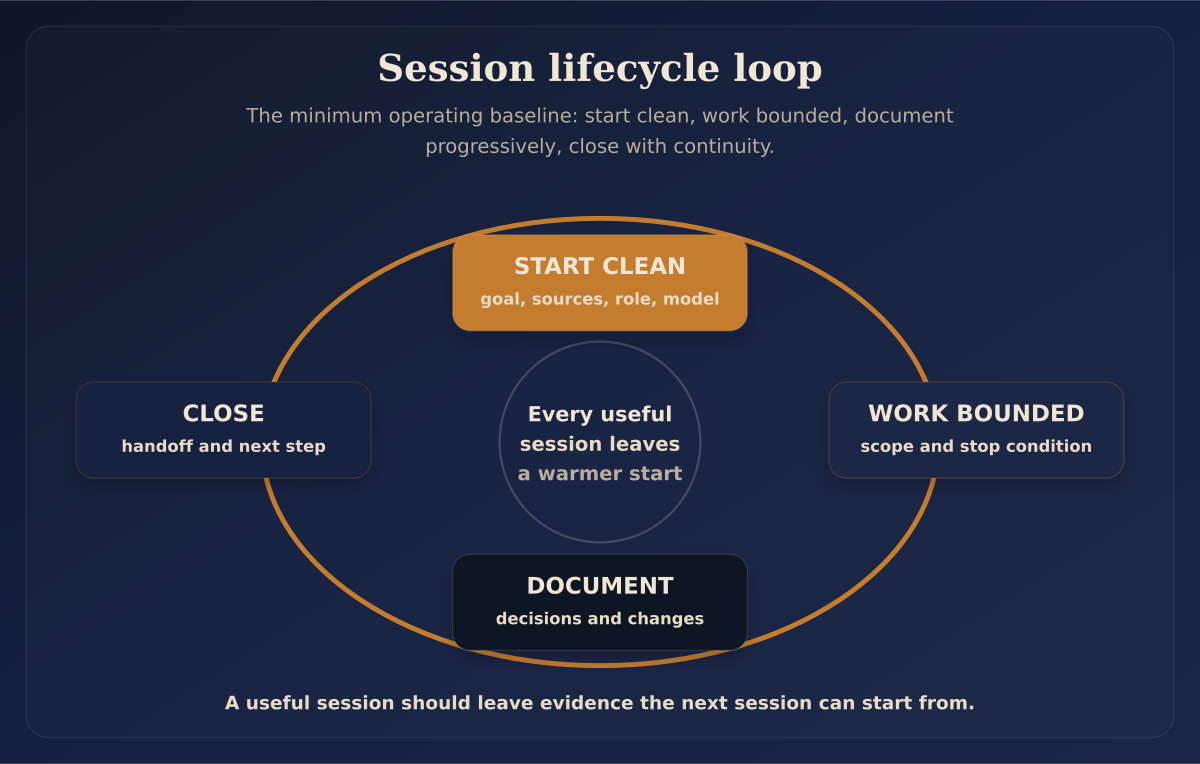
The minimum operating standard is session lifecycle. It is the first behavior change because it does not require a new platform, a full governance program, or a team-wide architecture. It requires users to begin with a brief and end with continuity.
Every meaningful AI-assisted work session should include four habits:
- Start clean.
- Work bounded.
- Document progressively.
- Close with continuity.
These habits reduce the context cost each session would otherwise pay again.
Start clean
Before starting a meaningful agent session, the user should answer a short set of questions:
- What project or workstream am I in?
- What am I trying to accomplish in this session?
- What files, sources, examples, and prior decisions should the agent use?
- What should the agent avoid?
- What role should the agent play?
- What model tier is appropriate?
- What counts as success?
This can live in a checklist, template, skill, or short session-start file. The format matters less than the habit. If the user already knows the shape of the work, the agent should not have to discover it from scratch.
A prepared task is usually cheaper than an improvised one because the model spends less time finding the target.
Work bounded
A good AI session has a scope boundary. The agent should know the kind of work it is doing, such as research, drafting, editing, code, review, summary, or planning. It should also know whether it can change files, run commands, browse sources, or only propose next steps.
Without boundaries, sessions drift. A draft becomes a strategy memo, a research pass becomes a tool recommendation, or a coding task becomes a design debate. The model follows every turn because nothing tells it where the job stops. Bounded work can still be substantial; the important thing is that the session has a job instead of a blank slate.
Document progressively
The best time to preserve context is while the work is happening. Waiting until the end turns documentation into a separate task, and separate tasks are easy to skip.
Progressive documentation can be simple:
- add a decision to a decision log;
- update a project README;
- capture a useful prompt pattern as a template;
- save a source list;
- write a short continuation note;
- turn a repeated workflow into a skill;
- record acceptance criteria before revising a draft;
- preserve examples of approved and rejected output.
Documentation is usually the first thing teams postpone when delivery pressure rises. Agentic work creates a better opening: let the session preserve useful context as part of the work loop.
Close with continuity
A session is complete when the next session can inherit its context, not merely when an answer appears or an implementation lands.
A useful closeout should answer:
- What changed?
- What files or artifacts matter now?
- What decisions were made?
- What remains open?
- What should the next user or agent know before continuing?
- What needs review?
- What should be committed, versioned, or moved into a shared location?
Session closeout is one of the highest-leverage usage-management habits because it reduces repeated setup work. If nothing durable is left behind, the next session pays the same cost again.
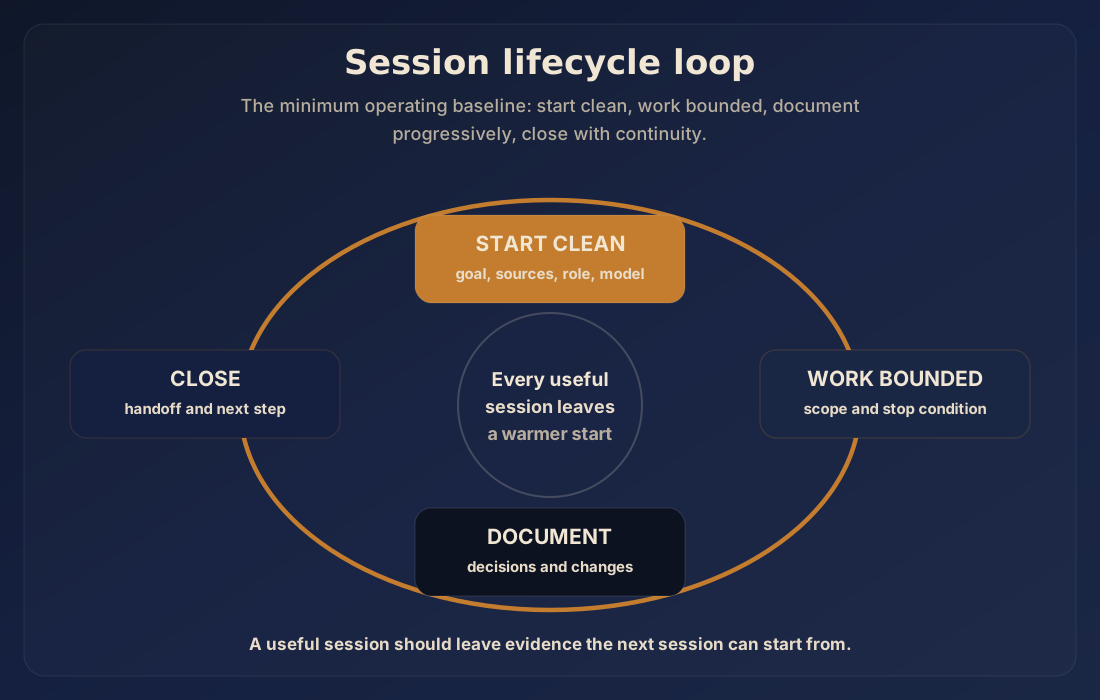
Figure 1. A useful AI session starts with context, stays bounded, documents as it goes, and closes with continuity.
4. Durable context: the project should teach the agent
A team cannot rely on memory inside individual chat threads. Projects need durable context that agents and humans can read.
Artifact names will vary by environment, but a practical baseline includes:
- a project overview or README;
- an
AGENTS.md-style context file or equivalent operating note; - a decisions log;
- progress or continuation notes;
- a source and reference index;
- examples, templates, snippets, or approved patterns;
- acceptance criteria and review checklists;
- folder-level context for complicated areas.
The context layer exists to make later sessions cheaper and better. It gives the next user or agent the project basics a returning teammate would normally explain in the first five minutes:
- what this project is;
- what matters most;
- what not to touch;
- what standards apply;
- where source material lives;
- what has already been decided;
- how to verify work;
- what boundaries are non-negotiable.
Every piece of context the project can reliably preserve is context the team does not have to rediscover.
For non-engineering teams, this does not have to start with a full software-development workflow. A shared document library with version history can be a stepping stone. The important shift is that reusable working knowledge leaves the chat and becomes part of the project.
Where possible, Git or GitHub is a strong fit for agentic work because the artifacts are durable, diffable, and reviewable. Diffs show what changed, history shows why, and reviews create a place to catch mistakes. Agents can inspect files more reliably than they can infer a team’s standards from scattered conversation.
Every team does not need to move into Git tomorrow. The recommendation is simpler: treat important AI-assisted work as versioned work product instead of disposable conversation. When a session produces useful context, decisions, examples, or patterns, that work should become part of the project.
5. Role-specific agents and skills
A general-purpose agent is convenient, but repeated work needs a more specific operating unit.
A documentation agent, research agent, coding agent, analysis agent, review agent, and session-start agent should not all have the same identity, tools, model tier, and success criteria. They do different work and carry different risk profiles. A review agent that can edit files creates a different risk than a documentation agent that can only summarize known sources.
The model is only one part of the operating unit. A better unit is:
agent identity + task scope + context package + allowed tools + model tier + evaluation standardModel choice alone cannot fix a poorly shaped task. A cheap model with broad tools, vague instructions, and no quality bar can waste usage quickly. A stronger model with clear context and a precise review standard can be economical if it prevents rework. Teams should design the whole work unit instead of stopping at prompt or model selection.
A role-specific agent should answer practical questions before it starts:
- What kind of work am I here to do?
- What sources should I trust?
- What tools may I use?
- What am I forbidden to do?
- What output format is expected?
- What checks must pass before I call the work done?
- When should I stop and ask for review?
The agent can help design these components. The time invested here pays back through lower setup time and more dependable output. A team can create a session-start skill, documentation skill, review skill, or drafting skill so users do not have to remember the right setup process every time. The skill carries the repeatable procedure; the user supplies the current task. That turns usage management into workflow design and saves stronger model time for work that actually needs it.
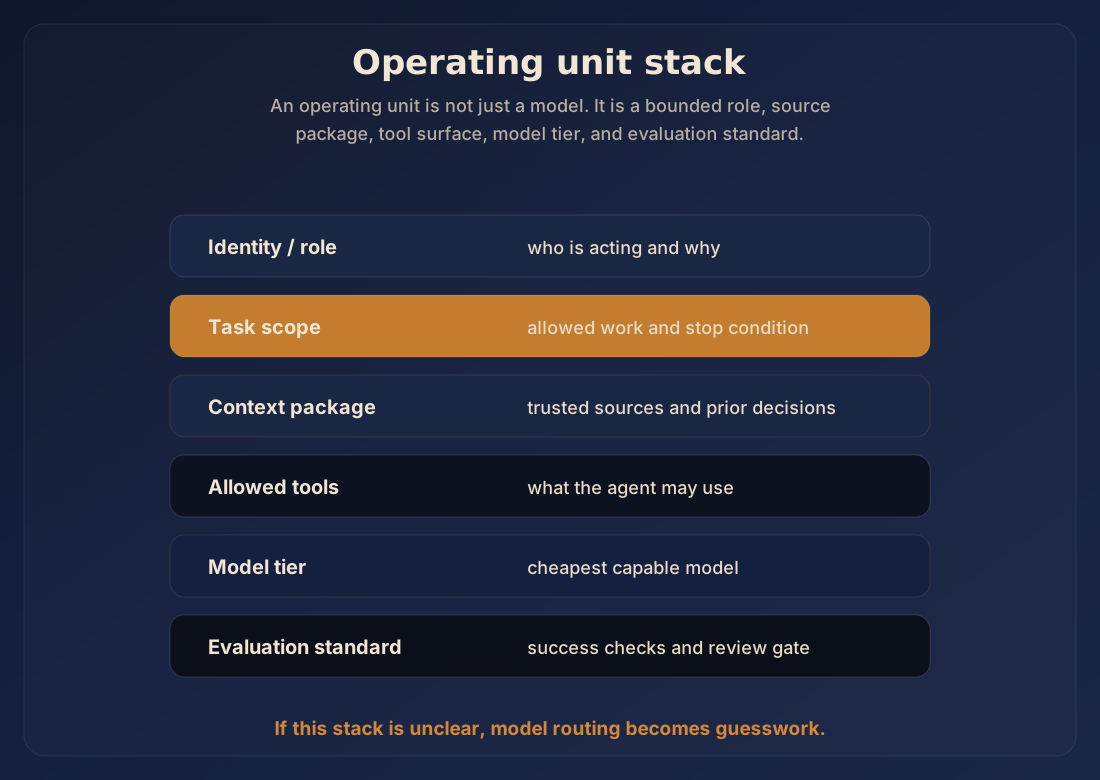
Figure 2. Model choice is only one layer of the operating unit; role, scope, context, tools, and evaluation matter too.
6. Model routing: use the cheapest capable model
The practical standard is to use the cheapest model that can consistently complete the task at the required quality bar, then escalate when ambiguity, risk, or judgment justifies it.
Cheaper models are often appropriate for:
- session setup;
- formatting;
- summarizing known sources;
- creating first-pass checklists;
- indexing files;
- applying a template;
- routine documentation;
- mechanical cleanup;
- bounded lookups where sources are provided.
Stronger models are often justified for:
- ambiguous problem framing;
- architecture or operating-model design;
- synthesis across messy sources;
- adversarial review;
- high-risk decisions;
- complex editing where voice and argument both matter;
- creating a reusable process that other agents will later run.
The strongest model should not become the team’s default coping mechanism for weak preparation. It should be used where judgment, ambiguity, risk, or synthesis justify the cost. A useful pattern is to spend stronger-model time on designing the repeatable process, then move routine execution to cheaper models once the work can be evaluated.
A recurring weekly report is a simple example. A cheaper setup or documentation agent can gather provided sources, apply the report template, check whether required sections are present, and prepare a first-pass summary. A stronger model should be reserved for the parts that need judgment: interpreting messy changes, reconciling conflicting sources, or critiquing the final narrative before it goes to a high-stakes audience. The routing decision should follow the work type rather than a generic belief that the strongest model is always safest.
The reverse mistake is assuming smaller models are dependable just because the process was designed with a stronger model. Moving work from a more capable model to a cheaper model should be tested across multiple scenarios and repeated enough times to avoid mistaking a lucky pass for a reliable default. The evaluation tasks should look like the real work rather than the easiest cases.
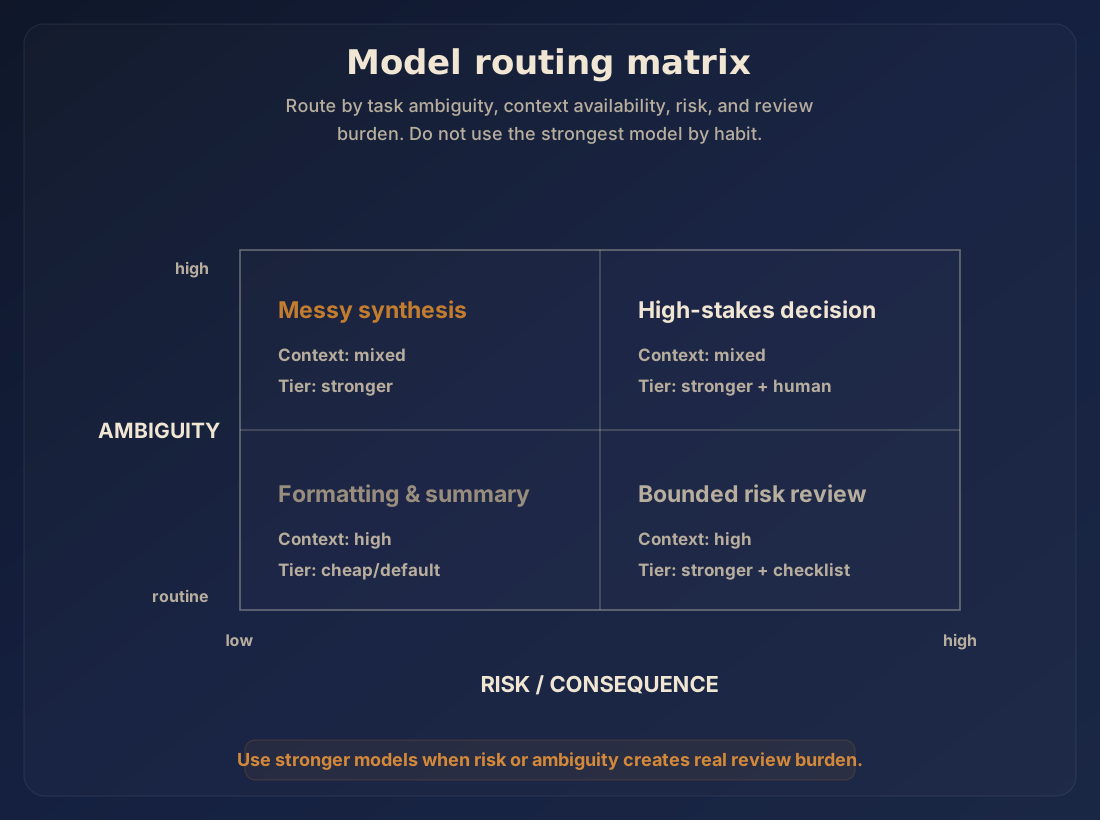
Figure 3. Route model strength based on ambiguity, risk, available context, and review expectations.
7. Shared registry and governance
If every user builds private AI habits, the team never gets compounding benefit. Good patterns remain local, bad patterns spread quietly, and nobody knows which skills, prompts, agents, hooks, or templates are approved.
A shared registry gives the team a place to keep reviewed defaults:
- agents and role instructions;
- skills and session-start templates;
- project context examples;
- drafting and review checklists;
- source packet templates;
- reusable snippets and code samples;
- accepted and rejected examples;
- operating standards and closeout patterns;
- known anti-patterns and programmatic hooks.
This does not need to be heavy or complex. A small registry with a few useful defaults beats a large library nobody trusts, but the registry still needs owners who review, approve, and deprecate components. AI champions should maintain the defaults and help the rest of the team use them. Experienced users should improve the registry when they find repeatable patterns. Individual users should start from the approved path instead of inventing a new process every time, and they should provide feedback about what works and what fails.
Feedback from less expert users matters because they often cannot work around a bad default. They expose the places where the system is confusing, brittle, or incomplete.
A useful registry makes the approved path easier than the improvised path. It should answer:
- Which agent should I use for this kind of work?
- Which session-start checklist applies?
- Where do I put reusable context?
- What examples show the expected output?
- What review standard applies before sharing work?
- Who can approve changes to shared defaults?
- What feedback loop tells us what works and what fails?
Confidentiality and access boundaries belong in the same operating layer. Instead of receiving every tool, source, and credential by default, role-specific agents should work with bounded access.
8. Maturity ladder
Teams do not need to jump from casual chat to a fully evaluated AI operating system overnight. The sequence below is a practical ladder. Teams can adopt the pieces that fit their work and skip what they do not need.
Level 0: ad hoc chat
The user opens AI and starts iterating from scratch. This is acceptable for low-stakes personal exploration, but team work under usage constraints needs more continuity.
Level 1: prepared task
The user defines the goal, constraints, sources, and success criteria before starting. This reduces waste because the agent has a clearer target.
Level 2: session lifecycle and durable context
Every meaningful session starts, proceeds, documents, and closes in a repeatable way. The project begins teaching the agent through durable files and reusable context.
This is the immediate baseline. It offers the largest compounding effect for the least effort, so it should be the first level a team aims for.
Level 3: role-specific agents and skills
Different work types use different agent identities, skills, tools, model tiers, and evaluation standards. The team stops asking one general assistant to handle every job the same way.
Level 3 works best after Level 2 habits are in motion. If the team still opens every meaningful session from a blank chat, role-specific agents can make routing look mature while the underlying context problem remains. Poor routing to less capable agents can also degrade quality or increase hallucination risk.
Level 4: shared registry and governance
Reusable agents, skills, templates, snippets, examples, and standards live in a reviewed shared system. The team has a way to improve defaults without forcing every user to become an AI workflow designer.
Level 5: evaluated operating system
Workflows are measured, reviewed, routed by cost and quality, and improved over time. The team can decide which work belongs with cheaper models, which work needs stronger models, which outputs require human review, and which patterns should become shared defaults.
Teams should move up only when the previous habits are already working in real sessions. If Level 2 is still fragile, Level 3 and beyond will add tooling before the team has the operating discipline to use it well.
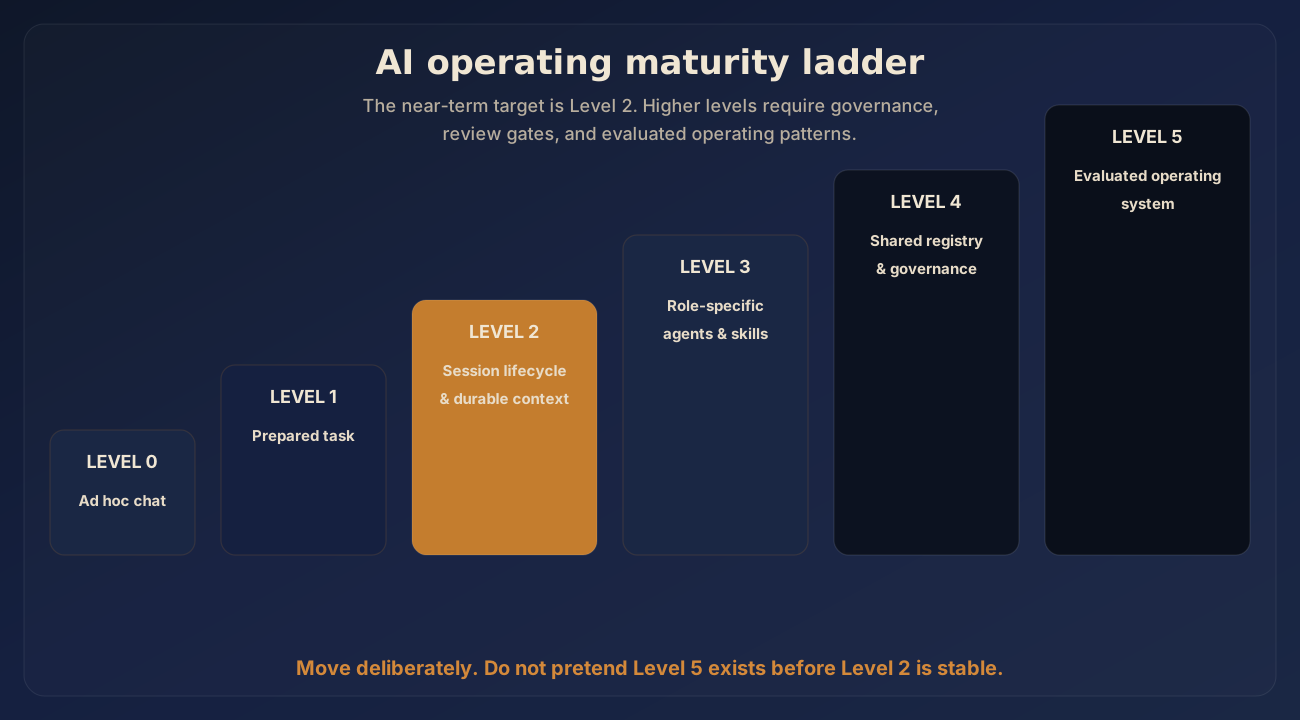
Figure 4. Teams mature from ad hoc chat toward evaluated, role-specific AI workflows by preserving context first.
9. Minimum operating baseline
A team facing usage constraints should start with a small baseline rather than a broad transformation program. The first two artifacts are a session-start template and a closeout template. Everything else becomes easier after those habits exist.
Baseline 1: session-start routine
Every meaningful AI-assisted session starts with a short brief:
Project / context:
Goal for this session:
Inputs and references:
Boundaries / do-not-do items:
Agent role:
Model tier:
Tools allowed:
Success criteria:
Expected output:
Closeout requirement:
A manager or AI champion can turn this into a template or reusable skill.
Baseline 2: durable project context
Every recurring project should have a place where agents can learn the basics without asking the user again. Start with a README or equivalent, then add decisions, source indexes, continuation notes, examples, and review checklists as the work matures.
Baseline 3: progressive documentation
Do not wait for a separate documentation sprint. Require sessions to preserve reusable learning while work happens. If the agent discovers a setup pattern, captures a useful source list, or creates a repeatable checklist, that durable context should stay with the project.
Baseline 4: closeout discipline
Every session that changes real work should end with a short handoff:
What changed:
Files / artifacts touched:
Decisions made:
Open questions:
Risks or claims needing review:
Recommended next step:
What the next session should read first:
Baseline 5: model-routing habit
Users should choose the model tier based on task ambiguity, available context, risk, and evaluation standard. Defaulting to the strongest model by habit hides the operating problem and makes cost harder to reason about.
Baseline 6: shared reuse location
Templates, skills, examples, checklists, and approved agent instructions need a shared home. It can start simple. It must be findable, reviewable, and maintained.
10. First 30 days: keep the rollout small
A practical rollout should start with one team or workstream and one recurring task where AI usage is already being wasted: a recurring report, document review, research summary, internal memo, coding task, or data task.
Use the first month as four staged moves:
- Week 1 establishes the session baseline: a start template, a closeout template, a shared place for reusable patterns, and a short list of recurring tasks where users waste time or usage.
- Week 2 gives the pilot workstream durable context, including a project overview, source index, decisions log, and examples of acceptable output.
- Week 3 routes only the repeated work into simple roles and model tiers.
- Week 4 uses real session evidence to improve the defaults and decide which patterns need governance.
Appendix A contains the detailed week-by-week checklist. The body of the brief keeps the main operating point in view: create continuity, preserve context, and route model strength where it is justified.
Minimal success check
Do not claim percentage savings without measurement. In the first month, use qualitative checks:
- Did the next session start with less explanation?
- Did the agent reuse project context instead of rediscovering it?
- Did the user choose the model tier intentionally?
- Did the session leave a handoff?
- Did a repeated pattern become a shared template, skill, or checklist?
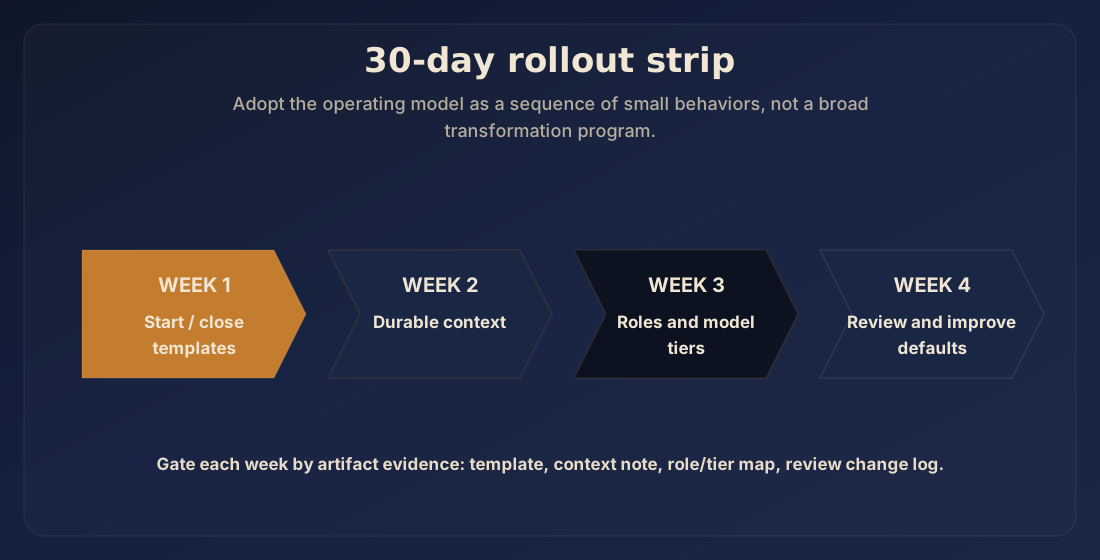
Figure 5. A small 30-day rollout proves session lifecycle and durable context before adding heavier infrastructure.
11. What each group should do
Managers
Managers should not try to solve usage constraints only through purchasing decisions. Capacity matters, but capacity without operating discipline becomes a larger bucket for the same leak.
Managers should fund and protect the shared operating layer:
- time for AI champions to build templates and standards;
- a reviewed location for reusable agents, skills, and examples;
- basic training on session lifecycle;
- norms for closeout and documentation;
- review paths for sensitive or high-impact AI outputs;
- clear boundaries around confidential information and tool access.
The management question should move from, “How much AI usage do we need?” to, “How much useful output are we getting per unit of usage, and which habits are wasting it?”
AI champions
AI champions should turn repeated lessons into reusable defaults. Their job is not to answer every AI question one by one. Their job is to improve the system so fewer people have to ask the same question again.
They should maintain:
- session-start templates;
- closeout templates;
- role-specific agent instructions;
- common examples;
- review checklists;
- approved source/context patterns;
- model-routing guidance;
- a short list of known failure modes.
They should also watch for patterns: where users burn usage, where sessions drift, where context is missing, and where shared artifacts would prevent rediscovery.
Individual users
Individual users do not need to become AI architects. They do need to stop treating every meaningful session like a fresh chat. Before starting, they should prepare the task, attach or point to relevant context, choose an appropriate role and model, and define success. During the work, they should preserve decisions and reusable patterns. At the end, they should leave a handoff so the next session is easier because this one happened.
12. What not to do
Do not turn usage constraints into a subscription or provider selection discussion. Vendor policies may matter, but this brief is about the operating discipline a team controls.
Do not make more credits the default answer. More capacity may be necessary, but it does not teach the team how to work.
Do not over-rotate into developer-only practices. Git, context files, skills, and agent registries are useful because they make work durable and reviewable. They should be introduced in ways non-developers can actually use.
Do not assume every workflow deserves an agent. Some work is still better handled by deterministic tools, existing business systems, or a human decision.
Do not move work to cheaper models until the task is bounded and the quality bar is clear. Test the outputs against real examples before treating cheaper execution as dependable.
Do not let governance become a binder nobody opens. A useful operating layer should make good behavior easier in the flow of work.
Closing remarks
Usage constraints are uncomfortable because they interrupt the illusion that AI work is unlimited. That interruption can be useful when it forces the team to look at how work actually starts, moves, and closes.
Reducing usage alone can cost the team productive momentum. Buying more capacity alone can preserve the same wasteful habits. The stronger response is to improve the operating model so each session makes the next one easier.
Every meaningful AI-assisted session should leave useful residue: a context update, decision, template, tested workflow, review standard, or handoff. That residue helps the team get more useful work from the usage it already has. The team stops asking the model to compensate for missing context every time and starts building a shared layer that carries context forward.
Appendix A: detailed 30-day adoption checklist
Use this appendix as a practical rollout checklist once the operating baseline makes sense for the team.
Week 1: establish the baseline
By the end of week 1, the pilot workstream should have:
- one team or workstream selected;
- a session-start template;
- a closeout template;
- a shared location for reusable AI work patterns;
- three recurring tasks where users waste time or usage.
This gives meaningful AI sessions a cleaner starting point.
Week 2: create durable context for real work
By the end of week 2, the pilot workstream should have:
- a project overview for one active workstream;
- a source/reference index;
- a decisions log;
- examples of acceptable output;
- a norm that users link or attach relevant context before long sessions.
The agent now has a project layer it can read instead of rebuilding context from chat history.
Week 3: split roles and model tiers
By the end of week 3, the pilot workstream should have:
- a small set of agent roles, such as setup/documentation, research, drafting, review, analysis, and coding if relevant;
- default model tiers by role and risk;
- named tasks that require stronger models;
- named tasks that should start with cheaper or default models;
- one review checklist for important outputs.
Repeated work now has clearer routing.
Week 4: review and improve the shared layer
By the end of week 4, the pilot workstream should use actual sessions and closeouts to answer four questions:
- Which setup work kept repeating?
- Which repeated steps should become a template, skill, checklist, or default agent role?
- Where did cheaper models work, and where did they fail?
- Which patterns now need governance, review, or human approval?
After 30 days, the team should have a working operating baseline.
Appendix B: advanced implementation options
The first 30 days should prove the operating baseline before the team adds more infrastructure. Once the baseline is working, these options can make the system more mature, efficient, integrated, and governable. They are not mandatory maturity levels. They are implementation paths a team can choose based on its work, risk, and technical environment.
| Option | What it adds | Best fit | Do not start here if… |
|---|---|---|---|
| LSP / language server integration | Symbol, reference, type, and diagnostics awareness for code work. | Software teams using AI for coding, refactoring, documentation, or review. | Tasks are still poorly scoped or the agent does not have basic project context. |
| Code graph and repository intelligence | Maps of files, dependencies, ownership, call paths, and architectural relationships. | Larger codebases, technical documentation, impact analysis, modernization, and agentic coding workflows. | The team only needs simple file edits or has not decided which code questions the graph should answer. |
| MCP and controlled tool access | A governed way for agents to reach approved tools, systems, data sources, and internal services. | Teams that repeatedly copy context from ticketing systems, documents, databases, CRMs, or internal tools. | The allowed actions, forbidden actions, logging, and approval boundaries are not clear. |
| Harnesses and work queues | Repeatable execution paths, role separation, dependencies, reviewer gates, and audit trails. | Client deliverables, multi-agent reviews, recurring research, coding, document production, and operational workflows. | The manual workflow has not been proven. Automating confusion only makes it harder to inspect. |
| Hooks and session automation | Pre-run context loading, post-run closeout, linting, artifact validation, and handoff generation. | Teams with repeated session patterns and clear documentation or review standards. | The rule cannot be stated plainly or still requires human judgment on every run. |
| Local and open-source model lanes | Private or lower-cost execution for bounded tasks, with escalation to stronger models when needed. | Cost-sensitive, privacy-sensitive, or high-volume tasks such as classification, extraction, summarization, draft review, and internal transforms. | The task has no measurable quality bar or the team cannot compare outputs against real examples. |
| Enterprise AI platforms such as Azure AI Foundry | Centralized model access, deployment controls, identity integration, policy management, and AI application operations. | Organizations already operating in enterprise cloud environments that need governance and integration with existing controls. | The team expects the platform to replace operating discipline. It will not fix unclear tasks, missing context, or weak review habits by itself. |
| Memory, retrieval, and knowledge architecture | Search and reuse across prior decisions, source documents, examples, glossaries, and project history. | Long-running projects, client programs, research-heavy teams, and workstreams where agents keep rediscovering the same facts. | The source material is messy, outdated, or unaudited. Retrieval amplifies the quality of the knowledge base. |
| Evaluation and quality gates | Golden tasks, rubrics, regression checks, deterministic validation, and calibrated review. | High-stakes outputs, repeated deliverables, coding agents, client-facing work, and model-routing decisions. | The team is using generic benchmarks instead of testing the actual work it expects agents to perform. |
| Specialist agents and multi-agent review | Distinct roles for research, drafting, editing, review, adversarial critique, implementation, or governance. | Complex work with separate failure modes, such as writing, research, architecture, coding, compliance, and strategy. | The added agent does not own a distinct decision, standard, tool boundary, or output. More agents can create more noise. |
| Observability and audit trails | Run logs, decision logs, trace data, artifact manifests, approval ledgers, and workflow dashboards. | Managed teams, client-facing delivery, regulated work, and agentic workflows with tool access or automation. | The team is tracking activity that nobody uses for decisions, review, or improvement. |
A team should prove the baseline first, then pick the extension that removes the next real bottleneck. Each extension needs an owner, an approval boundary, and a narrow workflow where the team can test whether it actually improves the work.